Retail & hospitality
Rostered shifts with unpaid breaks, and the iNdex POS till doubles as the time clock. Cashiers can be linked to their POS login; kitchen staff need none.
07:56Time & attendance · Payroll · Africa
Times is a clock-in app and payroll system for African businesses. Staff clock in on their phone inside a GPS geofence, at a shared kiosk, on the iNdex POS till or over WhatsApp. Times then turns approved hours into payslips, with PAYE, UIF and SDL worked out.
ways to clock in, with one set of rules and one audit trail
SARS PAYE tables, UIF and SDL built into the rule pack
offline taps are kept on the phone and sent when signal returns
unchecked hours paid: flagged shifts block the pay run until reviewed
06:00Who it's for
Shops, kitchens, sites and night shifts: people who work in shifts, often in more than one place, and are paid by the hour or by the month.
Rostered shifts with unpaid breaks, and the iNdex POS till doubles as the time clock. Cashiers can be linked to their POS login; kitchen staff need none.
Each site gets its own geofence. When data is thin, staff can clock in over WhatsApp, or the app saves the tap until signal returns.
Overnight shifts such as 19:00–06:00 count on the day they started, in the site's own time zone, with Sunday and public holiday rates applied.
Several sites, each with its own radius, plus departments and positions. A live board shows who is in, on a break or out right now.
07:56Clocking in
Every tap goes through the same checks, whichever way staff clock in: roster windows, the geofence, duplicate taps and the site's time zone. Anything unusual lands in a Needs review queue for a manager. It is never quietly paid.
Employees sign in once with a company code, their employee number and a personal PIN. The account works on one phone at a time.
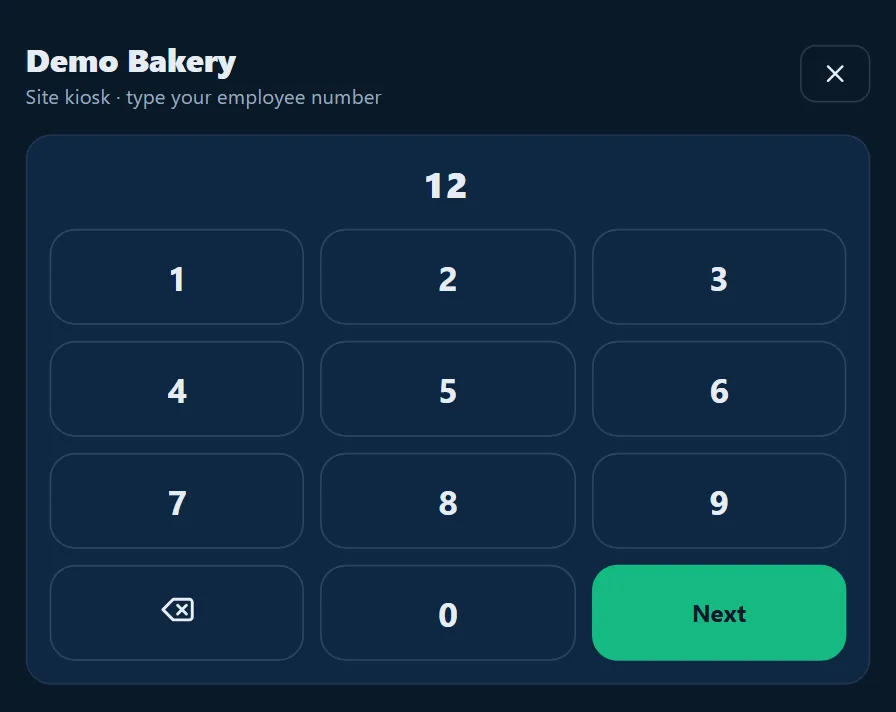
Any signed-in device can become a site kiosk. Staff type their employee number and PIN, then tap Clock in, Start a break or Clock out. Six seconds later the screen is ready for the next person.
On iNdex POS, the Clock in / out screen takes the same employee number and PIN, so you need no extra hardware at the counter.
Staff message the business's WhatsApp number to clock in or out, take a break, check their hours or roster, ask for leave or get their payslip. They can write in isiZulu, isiXhosa, Sesotho, Setswana, Afrikaans and more, and the assistant replies in English. The same geofence and roster rules apply, and you can switch it off for your business.
 Demo Bakerybusiness account
The replies use the system's own wording.
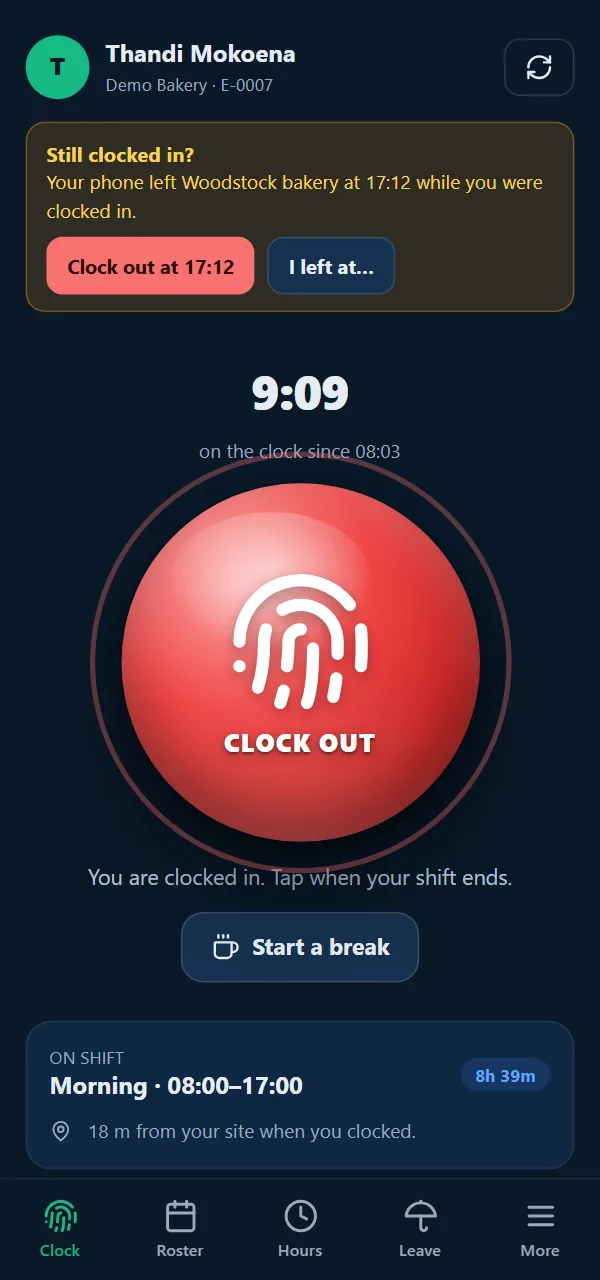
17:12The forgotten clock-out
Forgotten clock-outs cause the classic timesheet dispute. Times treats them as something to check, not something to pay.
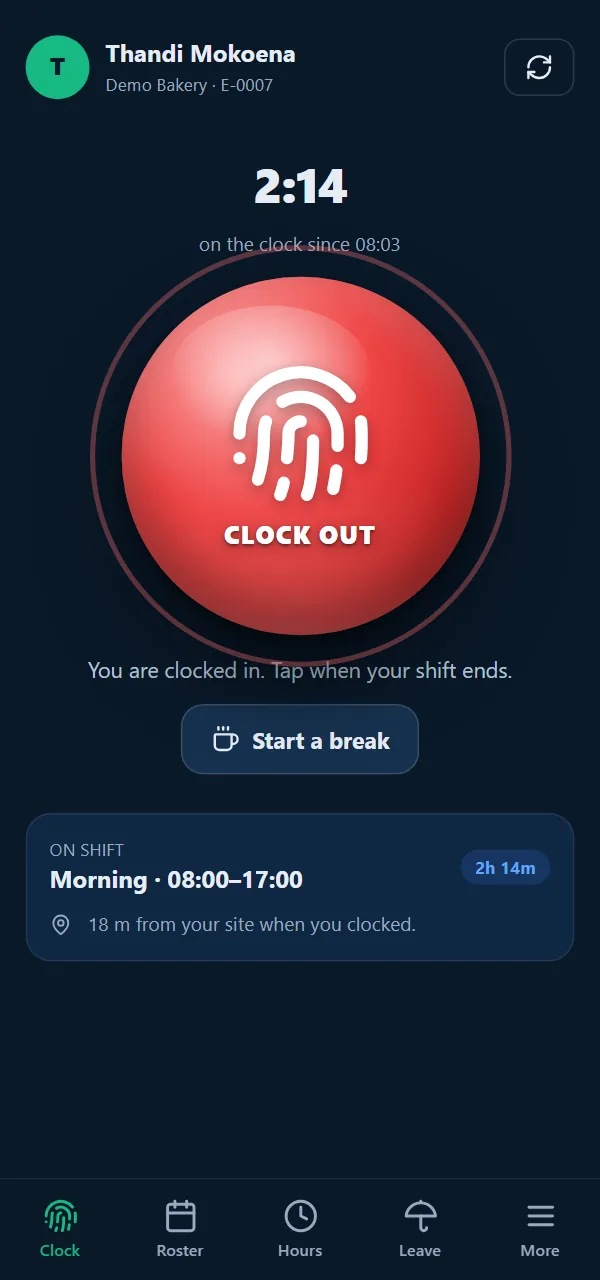
While someone is clocked in, the app watches the site's geofence in the background on Android and iOS, and notes the time the phone leaves.
The app offers "Clock out at 17:12" or "I left at…". Nothing is clocked out automatically, and the manager can see that the employee reported the time.
If nobody acts, the server closes the shift after its scheduled end and flags it as a missing clock-out. The pay run can't be finalised until a manager has checked it.
12:30Rosters & leave
Shift templates for each site, a roster on every phone, and leave balances that follow the Basic Conditions of Employment Act instead of a spreadsheet.
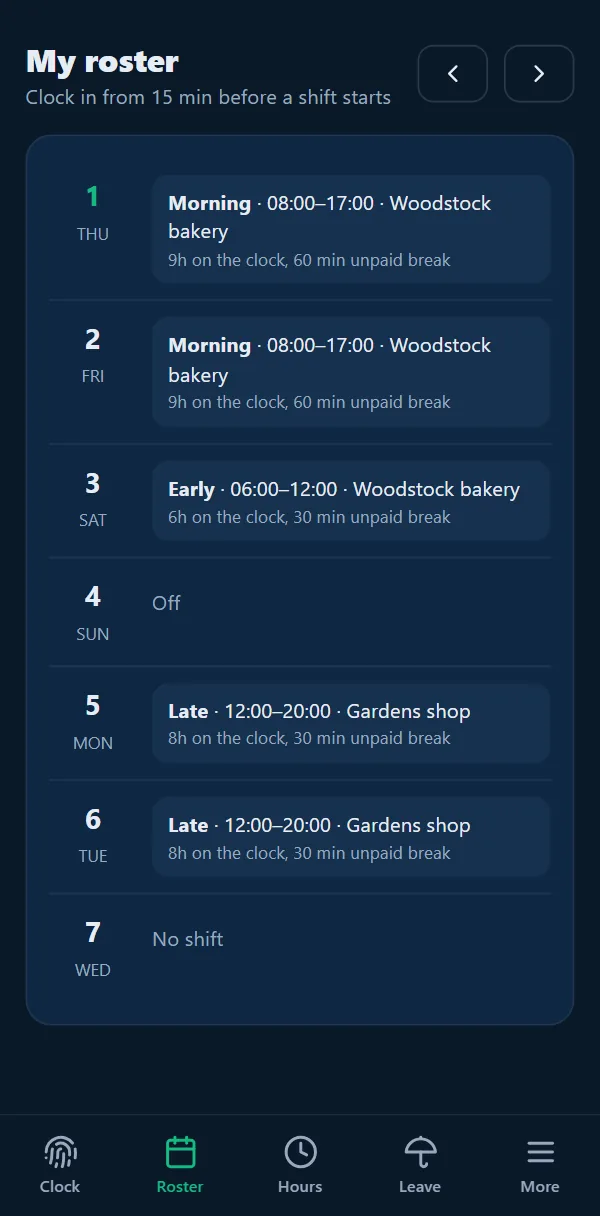
Each shift shows its site, its hours and its unpaid break. Enforce the roster, so staff can clock in from 15 minutes before a shift starts, or let them clock in at any time.
The South African calendar includes Good Friday, Family Day and the rule that a Sunday holiday moves to Monday. Holidays are marked on the roster.
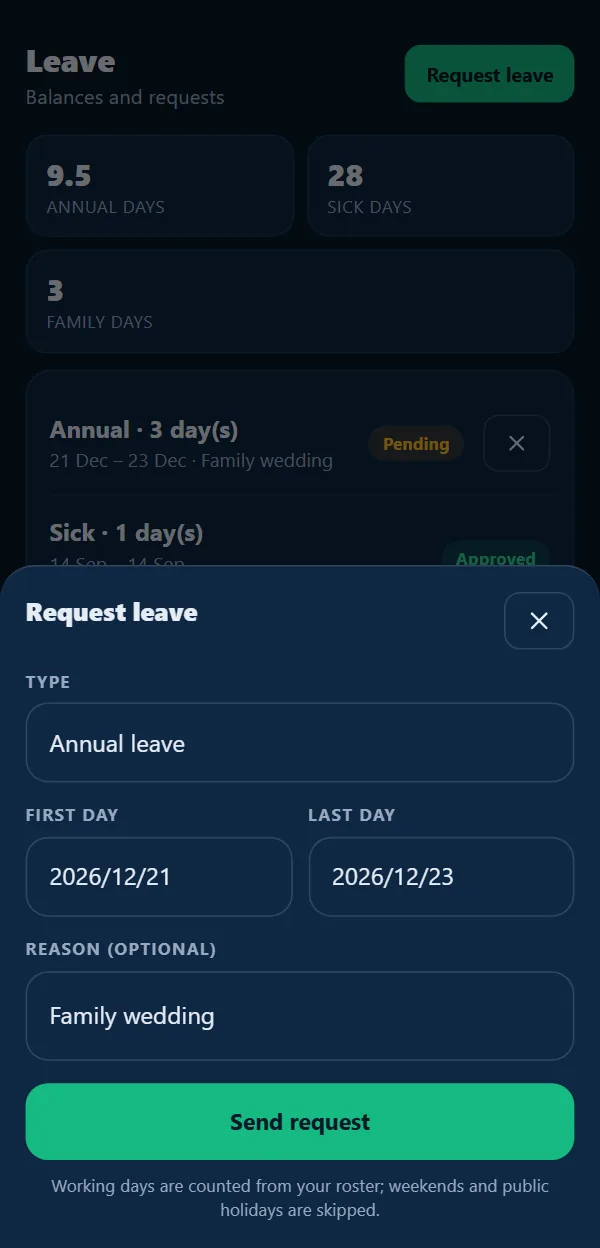
Annual leave builds up at 1 day for every 17 days worked. Sick leave follows the 30-day, 36-month cycle, and staff get 3 days of family responsibility leave a year after 4 months. Requests for annual, sick, family, maternity, parental or unpaid leave come straight from the app.
When a manager approves or declines leave, with a note if they like, it shows on the employee's phone right away. Company notices land on the same screen.
25 SepPayroll that does the maths
Times reads approved hours, applies the 2026/27 statutory rules and the BCEA minimums, and gives every employee a payslip they can open on their phone or share as a PDF.
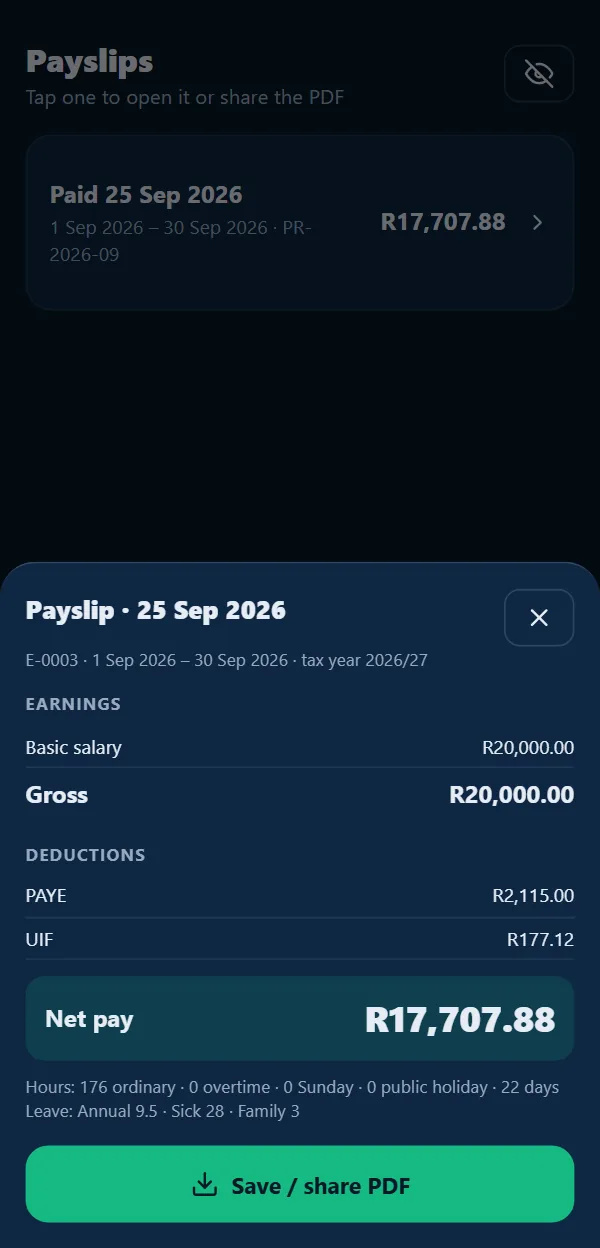
The annual-equivalent method, with primary, secondary and tertiary rebates by age. Pre-tax retirement contributions are capped at 27.5% of pay and R350,000 a year.
UIF is 1% from the employee and 1% from the employer, on pay up to R17,712 a month, scaled for weekly and fortnightly periods. SDL is 1% unless you're exempt.
Overtime starts after the daily limit and the 45-hour week, at 1.5× or more. Sundays are paid at 2× (1.5× for staff who usually work Sundays) and public holidays at 2×.
If an employee's effective hourly rate falls below R30.23, the pay run is blocked until it's fixed.
Salaries are pro-rated for people who join or leave mid-period. Recurring allowances and deductions can be a flat amount or a % of gross, before or after tax.
Finalised payslips can't be changed. Corrections go into new adjustment or reversal runs, so the history stays intact.
The period is suggested for each pay frequency.
Issues such as unchecked shifts or a missing rate link straight to the fix.
A manager signs off the figures.
Hours lock, loan repayments and leave accruals post, and payslips reach phones.
Upload the bank file and mark each line paid.
Each runLoans, advances & deductions
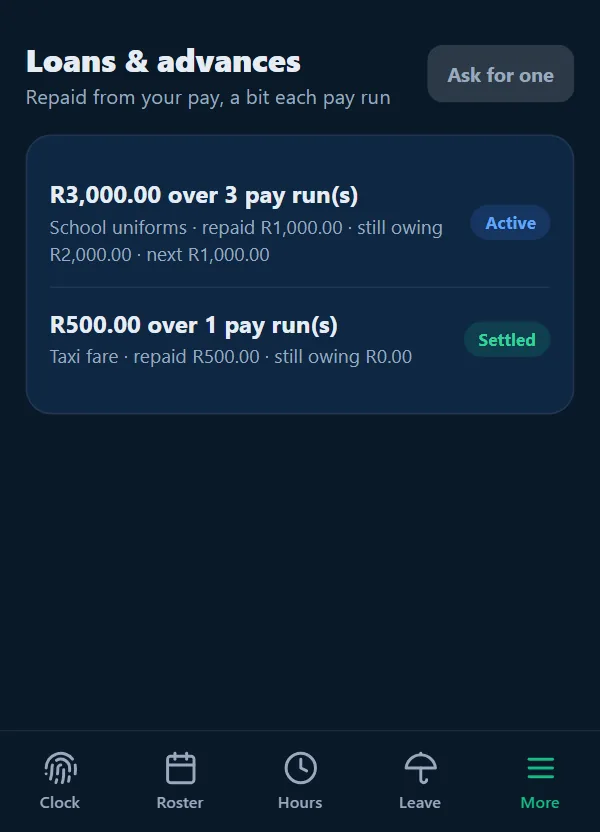
No more loans kept in a notebook. Staff ask in the app, a manager approves, and each pay run takes the next instalment.
Choose an advance on the next pay run, or repay over 2, 3 or 6 runs. Each person can have one open loan at a time.
The amount repaid, what is still owing and the next instalment show on both the employee's screen and the manager's.
Repayments post when a run is finalised. If a run is reversed, its repayments are reversed with it, and the loan never grows by mistake.
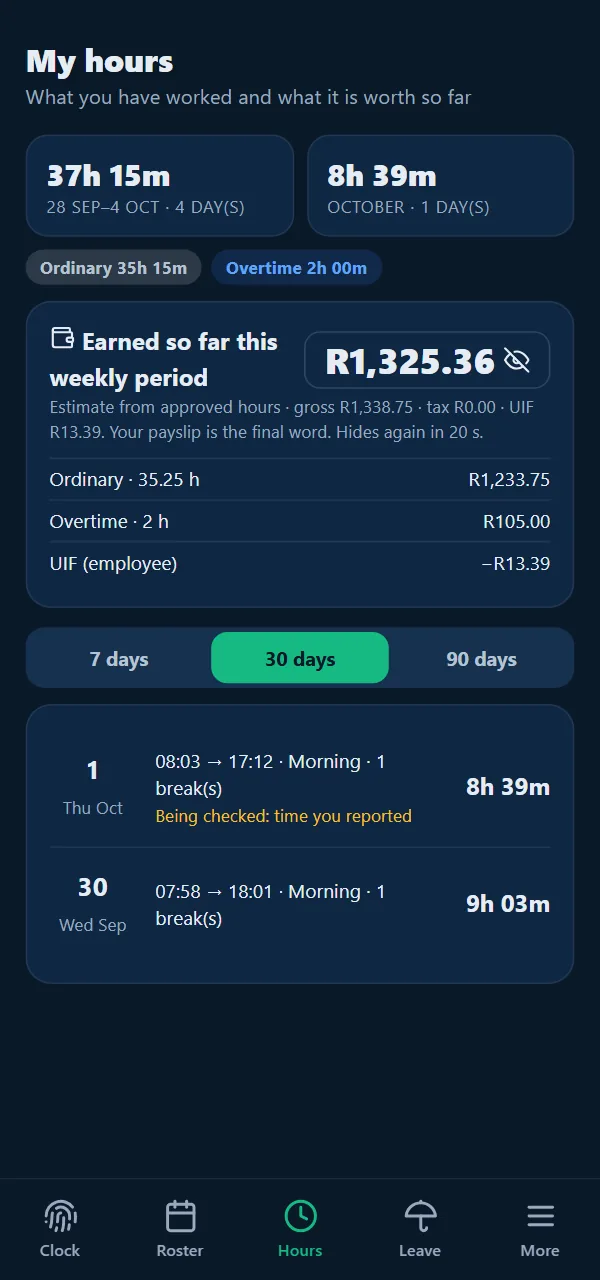
The Hours tab estimates what the employee has earned this period from approved hours. Amounts stay hidden until they tap the eye, and hide again after 20 seconds.
All dayWorks with iNdex POS
Times runs on the same iNdex account as iNdex POS, so your shop, team and sites are already there. Switch Times on under Settings → Modules, and the till's Clock in screen, the live attendance board and the employee app all work from the same records.
For every shop. Nothing in the POS depends on Times.
The live board updates as people clock in.
Payroll builds on attendance, so it switches on the rest of Times too.
A shop that only uses the POS never sees, or pays for, Times. Times is quoted for each business, with or without payroll: ask for a quote or compare the POS plans.
Day oneHow it works
Sign up with Times for attendance, or Times with payroll, switched on. Already on iNdex POS? Switch it on under Settings → Modules.
Get startedStand at the shop and use the device's location for the site. Then set the radius, shift templates and clocking rules.
Times settingsAdd each person's employee number, PIN, pay profile and roster. They sign in with your company code and choose their own PIN.
Team → Add employeeStart a run, fix any issues, approve and finalise it, then download the bank file and mark it paid. Your EMP201 figures are ready before the 7th.
Payroll → New pay runTimes works out PAYE from the SARS 2026/27 tax tables (annual-equivalent method with age rebates), UIF at 1% for the employee and 1% for the employer up to the ceiling for the pay period, and SDL at 1% unless you are exempt. It gives you EMP201 figures every month and CSV working papers for EMP501, IRP5/IT3(a) and the UI-19 list. The rules are kept as a versioned rule pack that is reviewed every tax year, and each pay run records the version it used.
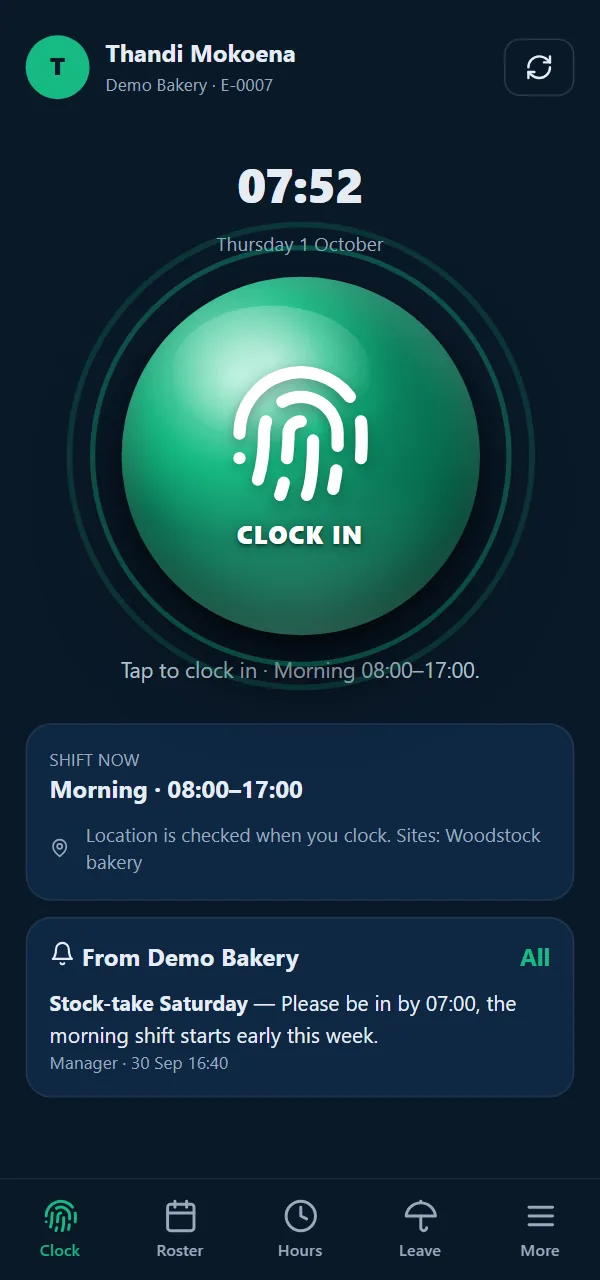
Four ways, all with the same rules: the Times app on their own phone (location checked against the site geofence), a shared tablet in site kiosk mode with employee number and PIN, the Clock in screen on the iNdex POS till, or a WhatsApp message to the business number.
Each site has a location and a radius (100 m by default). When someone clocks in on their phone, the distance to the nearest site is measured. You choose whether a clock-in outside the radius is refused or accepted and flagged for a manager to review.
No. The fingerprint on the clock button is only the icon. Identity comes from the employee's own phone, which is linked to one account at a time, or from the employee number and PIN at a kiosk or till. Five wrong PINs lock the account for ten minutes.
While someone is clocked in, the app watches the site geofence. If their phone leaves, the app notes the time and offers to clock them out at that time; nothing is clocked out automatically, and the manager sees that the employee reported the time. If nobody acts, the server closes the shift after its scheduled end, marks it for review, and payroll waits until a manager has checked it.
Yes. With no signal, a tap is saved on the phone and sent automatically when the phone is back online, with the time of the original tap. The server accepts saved taps up to 24 hours old.
Yes. Attendance (staff, rosters, clocking, leave, loans and the live board) and payroll (pay runs, payslips, statutory figures and payouts) are separate modules on your iNdex account. Switch on Times for attendance alone, or add payroll when you are ready.
Times is quoted for each business, with or without payroll, based on the size of your team and the number of sites. You can create an account and try it with your own team on the free trial, ask us for a quote, and see the iNdex POS plans on the pricing page.
Your timeGet started
Create your account, add a site, a shift and a few staff, and clock in a test shift. Rather have us walk you through it? Talk to us and we follow a test shift all the way to a payslip with you.